Python
Python Programming MOOC 2024

About this course
This is the course material page for the Introduction to Programming course (BSCS1001, 5 ECTS) and the Advanced Course in Programming (BSCS1002, 5 ECTS) from the Department of Computer Science at the University of Helsinki.
Lectures
There are no more live lectures for this year’s MOOC instance. The lecture recordings can be viewed on the table below.
VCode
Installing Visual Studio Code
You can install Visual Studio Code with the following terminal command (works for Ubuntu):
sudo apt-get install codeIf this doesn’t work, please consult the Visual Studio Code installation instructions at https://code.visualstudio.com/docs/setup/linux
Installing TestMyCode Extension
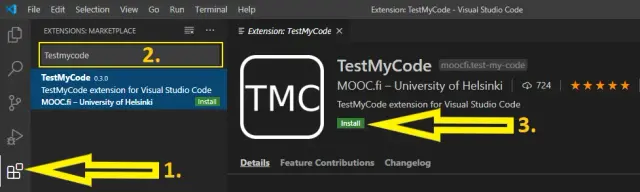
Installing TestMyCode Extension for VS Code
- Open Visual Studio Code by typing
codein the terminal. - At the left you can see icons, choose the
Extension view(see picture point 1). - Type
TestMyCodein the search field (see picture point 2). - Press the search result TestMyCode.
- Press “Install” (see picture point 3).
The first initilization of the extension will download some necessary components (this will take a while).