Python Helsinki: 2
Introduction to Programming: Part 10
More conditionals and loops
Some notes
Statement
A statement is a part of the program which executes something. It often, but not always, refers to a single command.
For example, print(“Hi!”) is a statement which prints out a line of text. Likewise, number = 2 is a statement which assigns a value to a variable.
A statement can also be more complicated. It can, for instance, contain other statements. The following statement spans three lines:
if name == "Anna":
    print("Hi!")
    number = 2
In the above case there are two statements (a print statement and an assignment statement) within a conditional statement.
Block
A block is a group of consecutive statements that are at the same level in the structure of the program. For example, the block of a conditional statement contains those sta
if age > 17:
    # beginning of the conditional block
    print("You are of age!")
    age = age + 1
    print("You are now one year older...")
    # end of the conditional block

print("This here belongs to another block")
In Python blocks are expressed by indenting all code in the block by the same amount of whitespace.
NB: the main block of a
Pythonprogram must always be at the leftmost edge of the file, without indentation:
# this program will not work because it is not written at the leftmost egde of the file
  print("hello world")
  print("this program is not very good...")
Expression
An expression is a bit of code that results in a determined data type. When the program is executed, the expression is evaluated so that it has a value that can then be used in the program.
Here are a few examples of expressions:
| Expression | Value | Type | Python data type |
|---|---|---|---|
| 2 + 4 + 3 | 9 | integer | int |
| “abc” + “de” | “abcde” | string | str |
| 11 / 2 | 5.5 | floating point number | float |
| 2 * 5 > 9 | True | Boolean value | bool |
Because all expressions have a type, they can be assigned to variables:
# the variable x is assigned the value of the expression 1 + 2
x = 1 + 2
Simple expressions can be assembled together to form more complicated expressions, for example with arithmetic operations:
# the variable y is assigned the value of the expression '3 times x plus x squared'
y = 3 * x + x**2
Function
A function executes some functionality. Functions can also take one or more arguments, which are data that can be fed to and processed by the function. Arguments are sometimes also referred to as parameters. There is a technical distinction between an argument and a parameter, but the words are often used interchangeably. For now it should suffice to remember that both terms refer to the idea of some data passed to the function.
A function is executed when it is called. That is, when the function (and its arguments, if any) is mentioned in the code. The following statement calls the print function with the argument “this is an argument”:
print("this is an argument")Another function you’ve already used often is the input function, which asks the user for input. The argument of this function is the message that is shown to the user:
name = input("Please type in your name: ")In this case the function also returns a value. After the function has been executed, the section of code where it was called is replaced by the value it returns; it is another expression that has now been evaluated. The function input returns a string value containing whatever the user typed in at the prompt. The value a function returns is often stored in a variable so that it can be used in the program later on.
Data type
Data type refers to the characteristics of any value present in the program. In the following bit of code the data type of the variable name is string or str, and the data type of the variable result is integer or int:
name = "Anna"
result = 100
You can use the function type to find out the data type of any expression. An example of its use:
print(type("Anna"))
print(type(100))
Sample output
<class 'str'>
<class 'int'>
Alternative branches using the elif statement
Often there are more than two options the program should account for. For example, the result of a football match could go three ways: home wins, away wins, or there is a tie.
A conditional statement can be added to with an elif branch. It is short for the words “else if”, which means the branch will contain an alternative to the original condition.
Importantly, an
elifstatement is executed only if none of the preceding branches is executed.
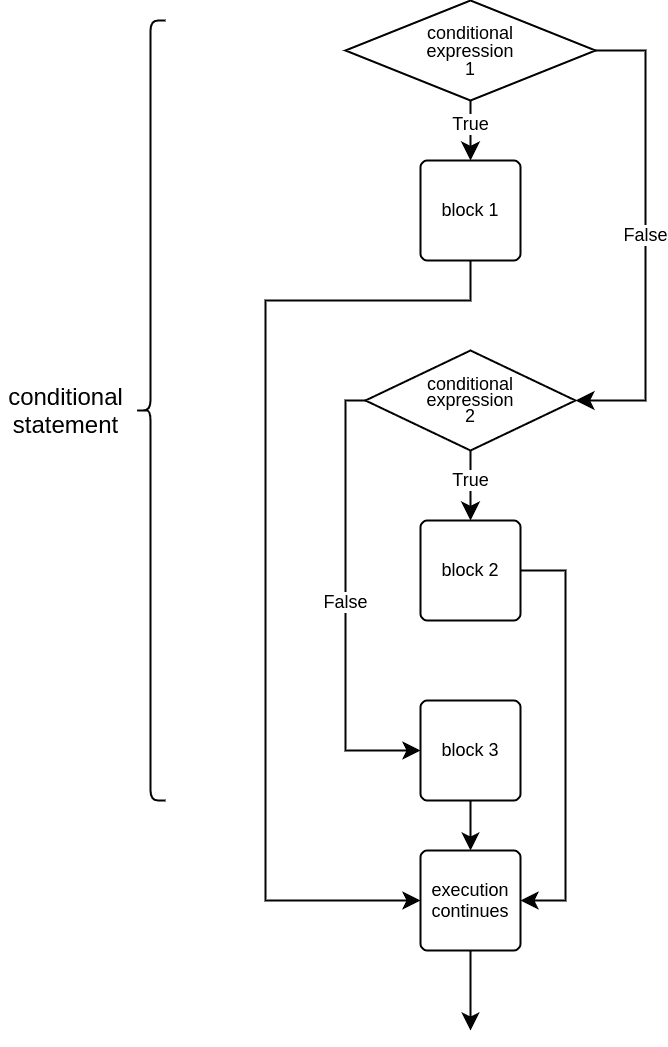
Let’s have a look at a program which determines the winner of a match:
goals_home = int(input("Home goals scored: "))
goals_away = int(input("Away goals scored: "))

if goals_home > goals_away:
    print("The home team won!")
elif goals_away > goals_home:
    print("The away team won!")
else:
    print("It's a tie!")
Conditions
The condition x >= a and x <= b is a very common way of checking whether the number x falls within the range of a to b.
An expression with this structure works the same way in most programming languages.
Python also allows a simplified notation for combining conditions:
a <= x <= b
achieves the same result as the longer version using and.
This shorter notation might be more familiar from mathematics, but it is not very widely used in Python programming, possibly because very few other programming languages have a similar shorthand.
Nested conditionals
Conditional statements can also be nested within other conditional statements. For example, the following program checks whether a number is above zero, and then whether it is odd or even:
number = int(input("Please type in a number: "))

if number > 0:
    if number % 2 == 0:
        print("The number is even")
    else:
        print("The number is odd")
else:
    print("The number is negative or zero")
With nested conditional statements it is crucial to get the indentations right. Indentations determine which branches are linked together.
For example, an if branch and an else branch with the same amount of whitespace are determined to be branches of the same conditional statement.
The same result can often be achieved using either nested conditional statements or conditions combined with logical operators.
The example below is functionally no different from the example above, in the sense that it will print out the exactly same things with the same inputs:
number = int(input("Please type in a number: "))

if number > 0 and number % 2 == 0:
    print("The number is even")
elif number > 0 and number % 2 != 0:
    print("The number is odd")
else:
    print("The number is negative or zero")
Loops
We have now covered conditional structures in some detail. Another central technique in programming is repetition, or iteration. Together these form the fundamental control structures any programmer must master.
They are called control structures because essentially they allow you to control which lines of code get executed when. While conditional structures allow you to choose between sections of code, iteration structures allow you to repeat sections of code.
They are often called loops because they allow the program to “loop back” to some line that was already executed before. The process of executing one repetition of a loop is also referred to as an iteration of the loop.
from math import sqrt
# Write your solution here

while True:
    number = int(input("Please type in a number: "))
    if number == 0:
        break
    elif number < 0:
        print("Invalid number")
    else:
        print(sqrt(number))
print("Exiting...")
Sample output
Please type in a number: 5
2.23606797749979
Please type in a number: 4
2
Please type in a number: -4
Invalid number
Please type in a number: 0
Exiting...